
Free restaurant budget template for Excel

A free restaurant budget template for Excel that keeps labor in line with sales: weekly labor budget by role, an overtime check and a monthly budget.

Jim McKelvey smiling, in a dark sweater over a white collared shirt

Jim McKelvey

Author ·

Reviewed by Jonan Junwikul

Growth, Kronto

A restaurant owner and a manager going over numbers on a tablet at a table.
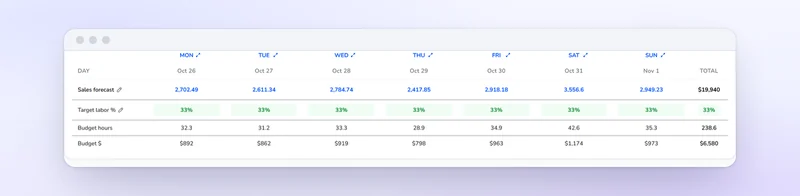
Kronto's labor budget table turning each day's sales forecast into budget hours and dollars.

Free download

Free restaurant budget template for Excel

Three working tabs: a weekly labor budget by role, an overtime check and a monthly budget. Every result is a formula and every benchmark names its source. Type in your own numbers and go.

Download the templateExcel file (.xlsx)

What should a restaurant budget template include?

At minimum: forecasted sales, a labor budget tied to those sales, scheduled hours and cost by role, food and beverage cost, rent, utilities and other operating costs, and a profit line. A useful one also compares budget with actual each month and flags overtime before the schedule goes out.

Kronto's free template covers all of it in three working tabs, plus a Sources tab. Download the restaurant budget template (.xlsx). It opens in Excel and in Google Sheets.

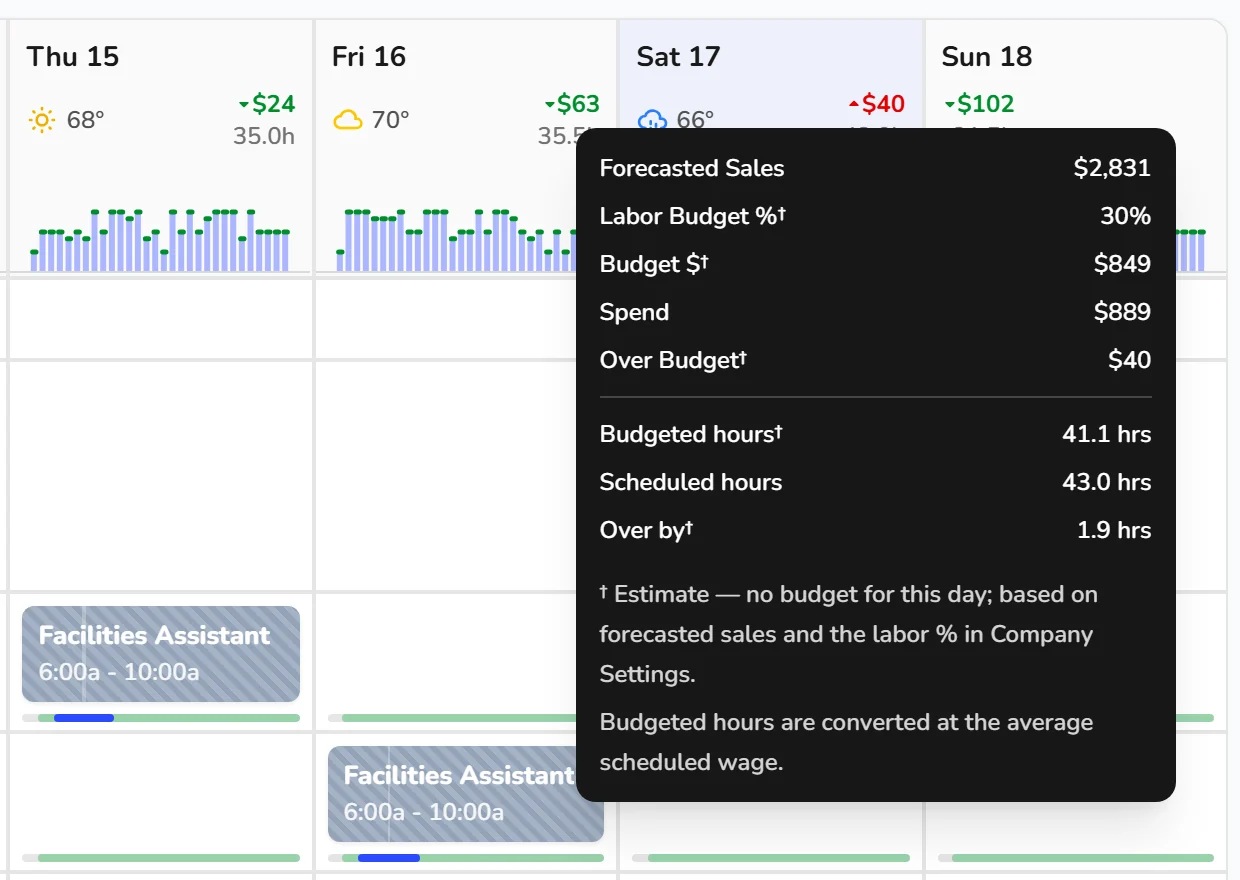
Kronto budget tooltip for a Saturday showing forecasted sales, the labor budget estimated from the company's labor percentage, scheduled spend, the amount over budget, and budgeted versus scheduled hours

Key takeaways

  1. Start from a sales forecast by day. Your food cost and labor targets become dollars from there.
  2. Each day gets its own labor dollars: forecasted sales times your target percentage.
  3. Fixed costs like rent, insurance and loan payments are budgeted in dollars.
  4. Prime cost is food and beverage cost plus labor. Toast notes most restaurants keep it around 60% of revenue.
  5. Check labor every week, before the schedule goes out. The monthly number shows up after the shifts are already paid.
  6. Payroll taxes, workers' comp and benefits count as labor cost. Leave them out and every labor percentage reads low.

How do you create a restaurant budget step by step?

Start with a sales forecast by day. Set target percentages for food cost and labor, and turn them into dollars. Add fixed costs like rent from your lease. Build the schedule against the labor dollars, check overtime, and compare actuals at month end. Then tune the targets using your own profitable months.

  1. Forecast sales by day. Use the same days last year or recent weeks, then adjust for events you know about.
  2. Set your percentages. Start with food and beverage cost and labor. Together they're your prime cost.
  3. Add fixed costs in dollars. Rent, insurance and loan payments don't move with sales. Don't budget them as percentages.
  4. Schedule against the labor dollars. Fill the Weekly labor tab role by role until each day is at or under budget.
  5. Check overtime before you publish. Federal law requires time and one-half for hours over 40 in a workweek⁠[1].
  6. Close the month. Enter actuals on the Monthly budget tab and read the variance column.
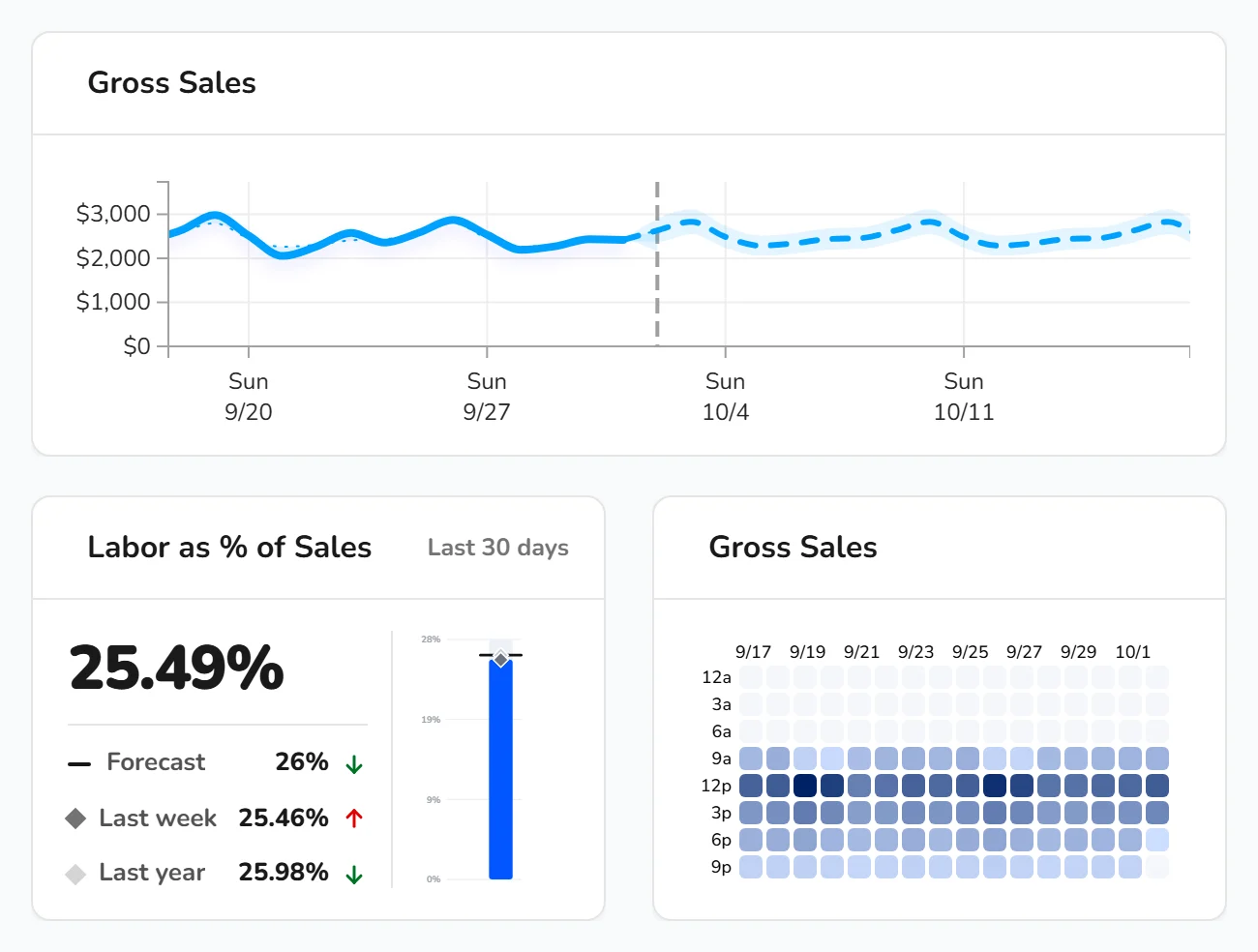
Kronto dashboard comparing a store's daily sales with the forecast, labor as a percent of sales against forecast, last week and last year, and a sales heat map

How do you budget restaurant labor by day instead of by month?

Multiply each day's forecasted sales by your target labor percentage. That's the day's labor dollars, and you schedule hours against them. A $3,000 Tuesday at a 30% target allows $900 of labor. A $7,400 Saturday allows $2,220. The template's Weekly labor tab does this math for every role.

Budgeting by day keeps a strong weekend from hiding an overstaffed midweek. Say Monday runs $300 over and Saturday $300 under. The week looks fine, but Monday's extra hours are still money you didn't need to spend.

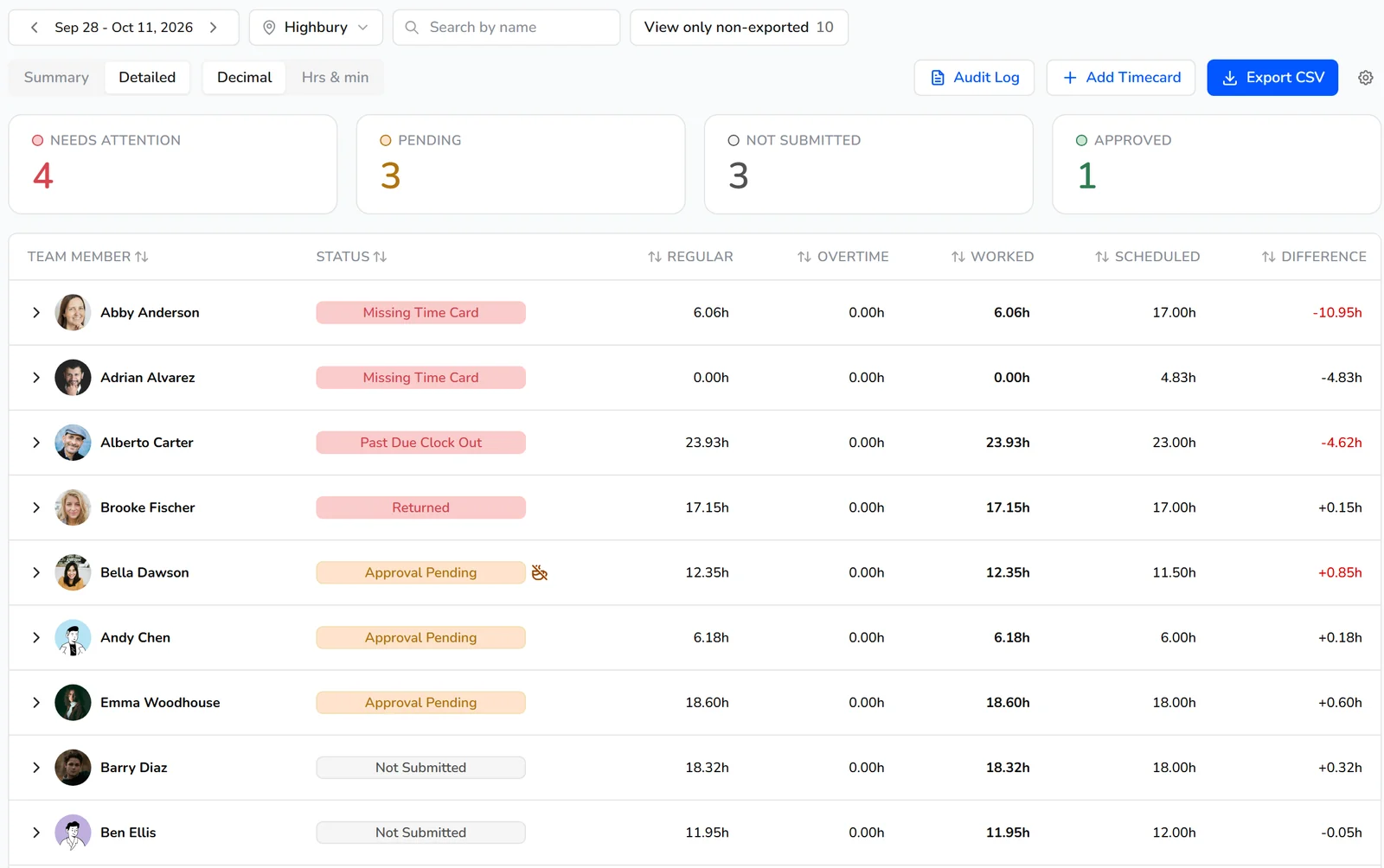
Kronto Time Cards page for a pay period, with summary cards for Needs Attention, Pending, Not Submitted and Approved, and each team member's regular and overtime hours

What is prime cost, and why does it matter in a restaurant budget?

Prime cost is food and beverage cost plus labor cost, your two biggest controllable expenses. Toast notes most restaurants keep prime cost around 60% of revenue, split roughly evenly between the two. When food costs rise, labor has to give to hold the same profit. That's why the template tracks both together.

Toast's labor cost guide describes this split⁠[2]. On the Monthly budget tab, the first two lines add up to a prime cost row you can watch against your ceiling.

What the template does, tab by tab

  • Weekly labor. Forecasted sales by day, your target labor percentage and labor load, and scheduled hours by role. Out come the labor budget, scheduled cost, labor %, over or under, and sales per labor hour, for each day and the week.
  • Overtime check. Each person's hours this week, split into regular and overtime, with the week's pay at time and one-half for overtime. For tipped staff, overtime is figured on the full minimum wage, not the $2.13 cash wage. The tab asks for the tip credit you take⁠[3].
  • Monthly budget. Each cost line as a share of budgeted sales, actual dollars at month end, prime cost, total costs and profit.
  • Sources. Every benchmark default, with its publisher, link and the date we checked it.

Every default has a source

The target labor percentage defaults to 30%, Toast's common benchmark⁠[2]. Pay rates default to BLS medians for May 2025: $17.98 an hour for restaurant cooks⁠[4], $15.00 for hosts and $16.34 for dining room attendants⁠[5], and $33.36 for food service managers⁠[6]. Dishwashers default to $16.73, the 2025 median from BLS wage data⁠[7]. The tipped server default is the federal minimum cash wage of $2.13 an hour. Many states require more, and you should use yours⁠[3]. Labor load defaults to 7.65%, the employer's share of Social Security and Medicare taxes⁠[8]. That's only the federal floor. Add your state payroll taxes, workers' comp and benefits.

How much of the budget goes to labor depends on your format. The National Restaurant Association's 2024 figures put labor, including benefits, at a median 36.5% of sales for full-service restaurants and 31.7% for limited-service. Operators that made a profit ran lower, at 34.2% and 30.0%⁠[9]. The Monthly budget tab lists these next to Toast's ranges by format.

Sales and hours in the sheet are examples, there to make the formulas show something. Replace them, along with any default that doesn't match your restaurant.

Four ways labor slips past the budget

  • Budgeting labor as wages only. Payroll taxes, workers' comp and benefits are labor cost too. Fill in the labor load cell.
  • One labor target for every day. A flat weekly number hides the slow days. Budget each day from its own forecast.
  • Checking labor monthly. By the time the month closes, the overspent shifts are paid. Look weekly, before the schedule goes out.
  • Copying someone else's target. Benchmarks are medians across many restaurants. Your own profitable weeks make a better target.

When the spreadsheet starts to feel like a second job, Kronto's labor budget does the weekly math inside the schedule.

Frequently asked questions

Is there a free restaurant budget template?

Yes. Kronto's restaurant budget template is free to download with no sign-up, and you can use it for as many locations as you like.

Does it work in Google Sheets?

Yes. Upload the .xlsx to Google Drive and open it with Google Sheets. The formulas carry over.

Can I use one template for several restaurants?

Make one copy per location. Each restaurant should budget from its own forecast and its own target. In Kronto, each location can have its own labor target.

How often should I update my restaurant budget?

Weekly for labor, before you publish the schedule. Monthly for the full budget, once actuals are in.

What pushes restaurant labor cost over budget?

Usually four things. Overtime, since hours over 40 in a workweek are paid at time and one-half⁠[1]. A full crew on a slow day. Payroll taxes and benefits left out of the budget. And raises the labor target never caught up with. The template's Weekly labor and Overtime check tabs show the first three.

Sources

  1. Overtime Pay, U.S. Department of Labor, Wage and Hour Division. Read October 23, 2026. ↩
  2. How to Calculate Your Restaurant Labor Cost Percentage, Toast. Read October 23, 2026. ↩
  3. Fact Sheet #15: Tipped Employees Under the Fair Labor Standards Act (FLSA), U.S. Department of Labor, Wage and Hour Division. Read November 10, 2026. ↩
  4. Occupational Outlook Handbook: Cooks, U.S. Bureau of Labor Statistics. Read October 23, 2026. ↩
  5. Occupational Outlook Handbook: Food and Beverage Serving and Related Workers, U.S. Bureau of Labor Statistics. Read November 10, 2026. ↩
  6. Occupational Outlook Handbook: Food Service Managers, U.S. Bureau of Labor Statistics. Read November 10, 2026. ↩
  7. Dishwashers (35-9021.00): Summary Report, O*NET OnLine, U.S. Department of Labor. Read November 10, 2026. ↩
  8. Topic no. 751, Social Security and Medicare withholding rates, Internal Revenue Service. Read November 10, 2026. ↩
  9. Elevated labor costs had a significant impact on restaurant profitability in 2024, National Restaurant Association. Read November 10, 2026. ↩

Toast benchmarks checked on Oct 23, 2026; NRA, BLS, DOL and IRS figures checked on Nov 10, 2026. Template formulas tested in Excel. Last reviewed November 16, 2026.

Reviewed by Jonan Junwikul, Growth, Kronto, on November 16, 2026.

Budget from the hours you actually pay

In Kronto, the labor line comes from the same hours you schedule, clock and pay, not from a spreadsheet you update by hand. Scheduling, the time clock and tips come with Standard, and Pro lets you run the payroll itself, in early access.

Free for up to 10 people