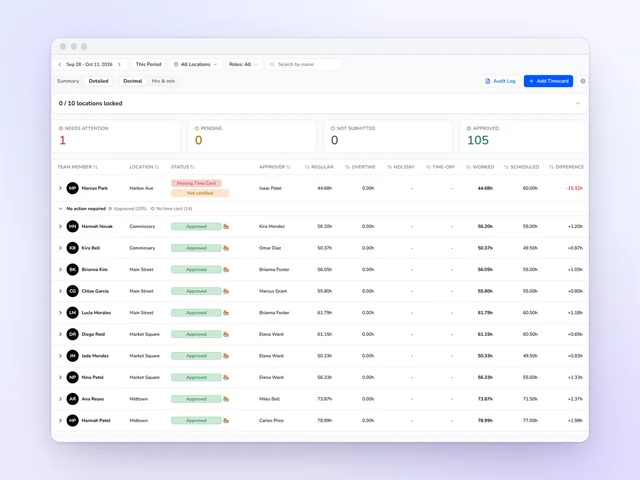
Time clock and time cards
Approve the week without opening every card, and send approved hours on to payroll.
See moreRestaurant labor budget software
Restaurant labor cost percentage gets decided the day you write the schedule, long before payroll closes. Kronto turns each location's sales forecast into a daily labor budget at your target and keeps score as you add shifts. Managers send the budget for sign-off, and when the week ends, it's reviewed against what really happened.
No credit card requiredFree for up to 10 people
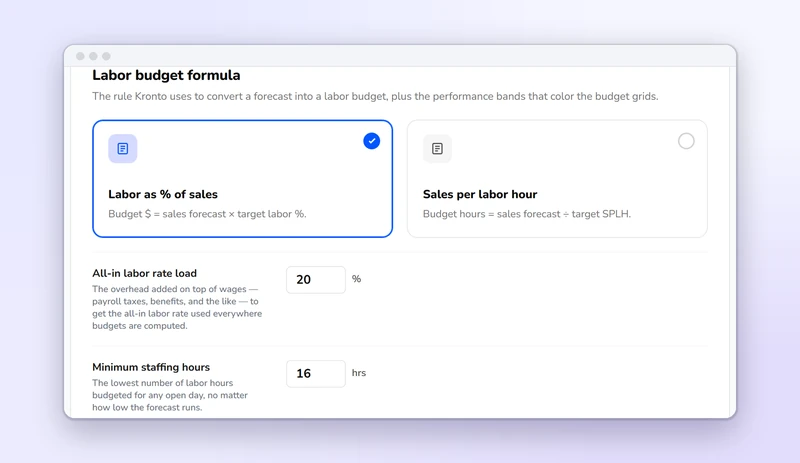
Your labor target
An admin turns on the Budget workflow and picks how a forecast becomes a budget. From then on, Kronto does the math for every location and every day.
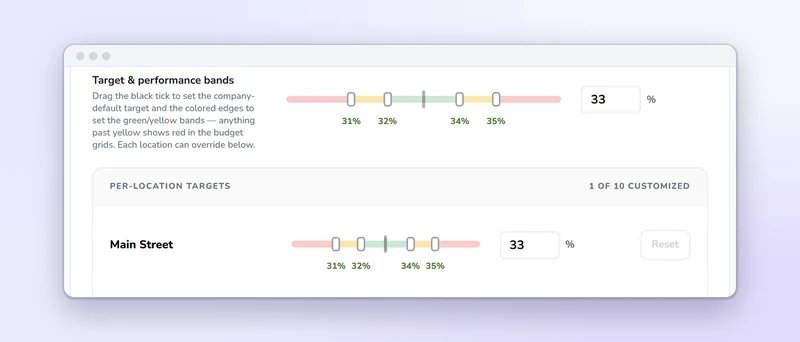
Targets and bands
Drag the target and its green and yellow bands along one bar. Every budget grid colors each day against them, and the day outside the band jumps out. A big location and a small one can each have their own target, and so can a single day in a week's budget.
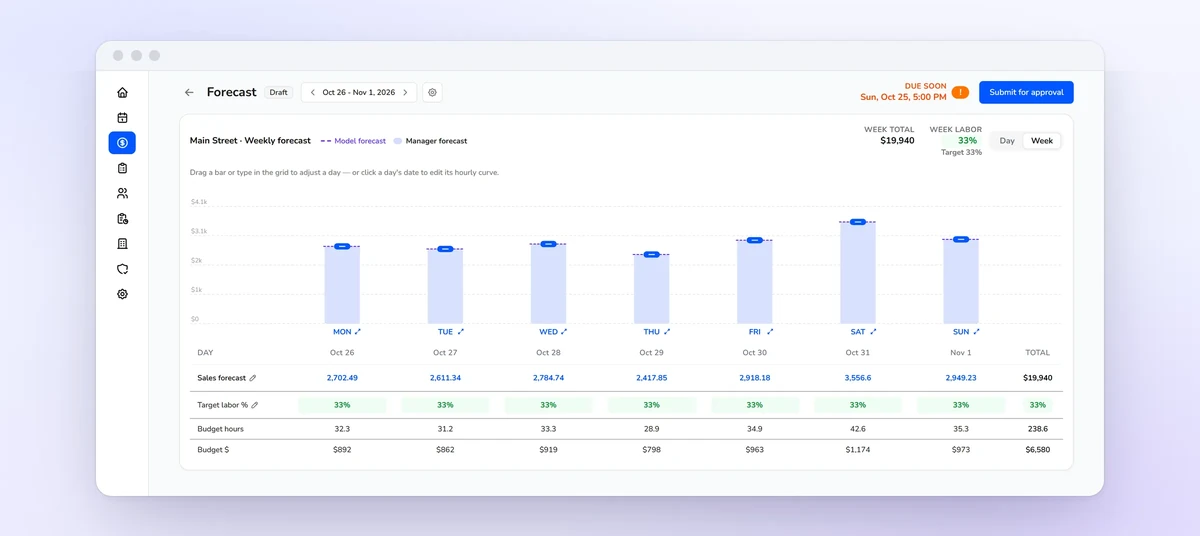
Weekly budget
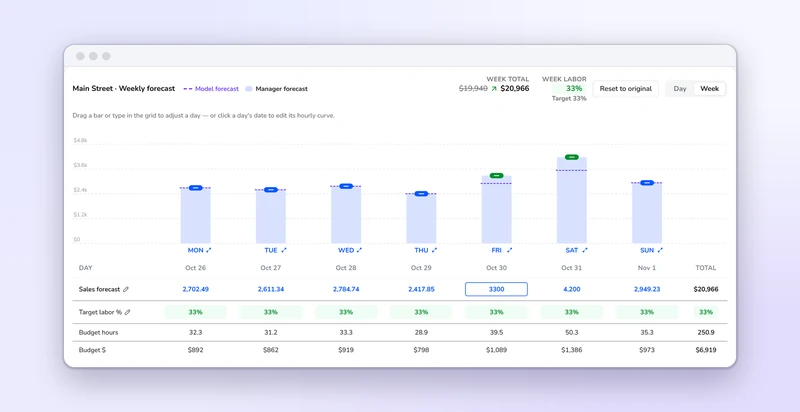
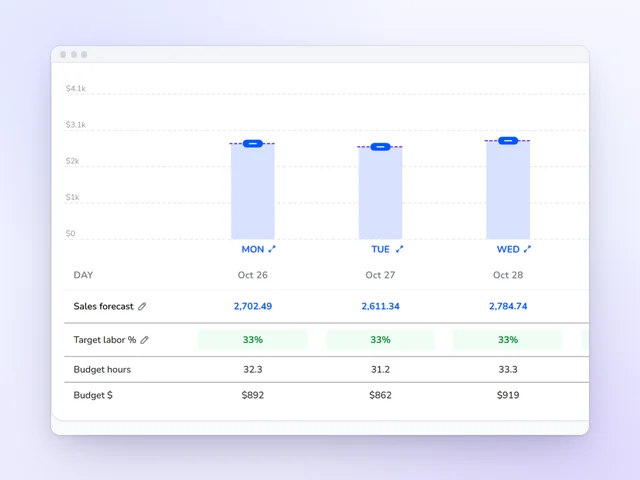
Each location's week opens with the sales forecast already filled in, and every day becomes budget hours and budget dollars at your target. Bump a day up and its hours and dollars move with it. The week's total and labor percentage sit against the target the whole time.
Sign-off
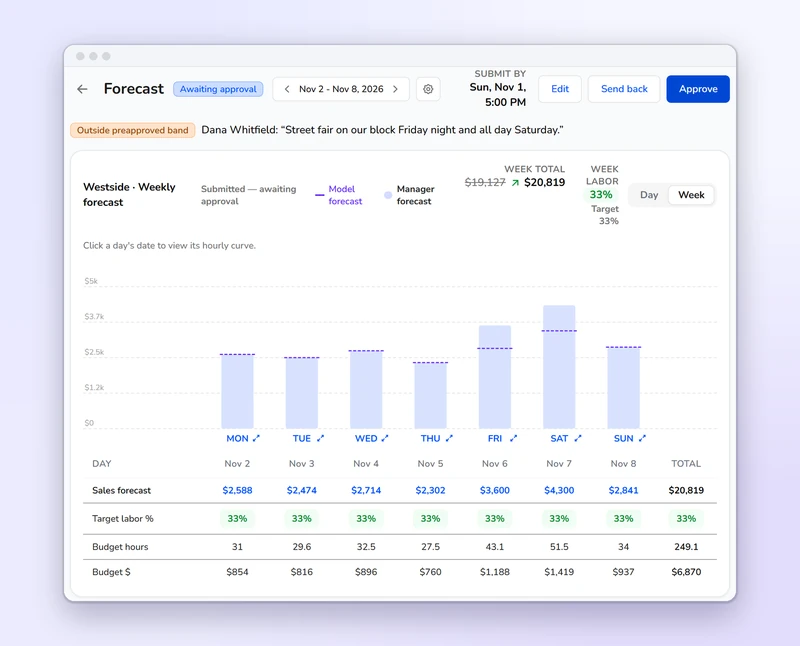
A location manager submits the week. A budget outside the band needs a written reason, and the approver sees it beside the numbers. They approve it, edit it or send it back with a note. When the manager is also the approver, submitting and approving is one step.
Approval flow
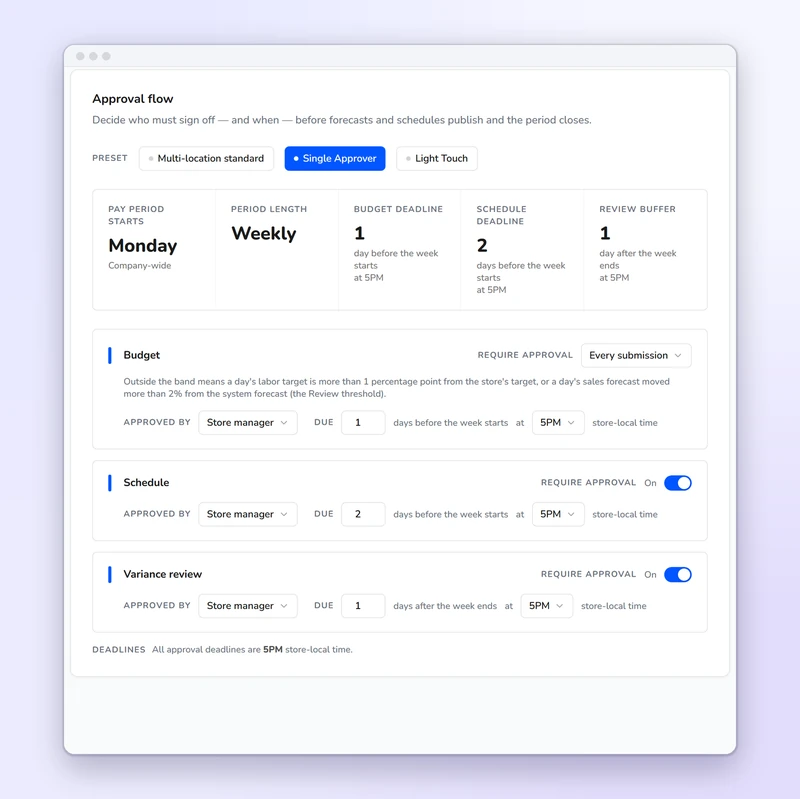
Start from a preset or set each step yourself. Each step gets an approver and a due time, in the location's local time.
Every location
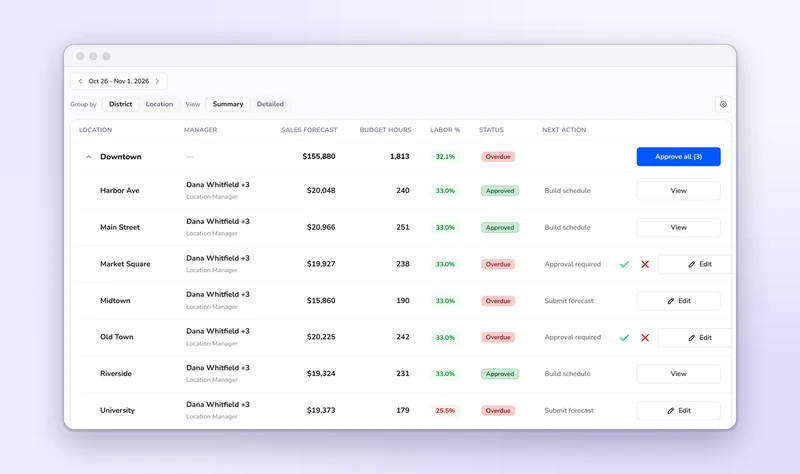
District managers and owners see each location's sales forecast, budget hours and labor percentage together, grouped by district or listed one by one. Approve one, send one back, or approve a whole district in a click.
In the schedule
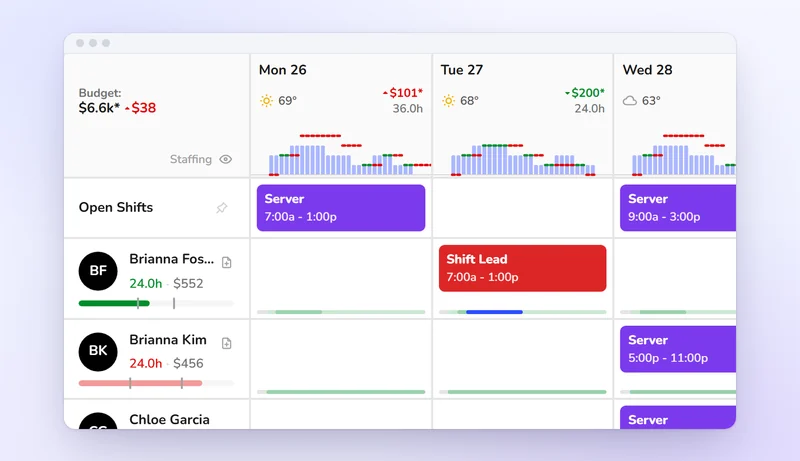
Put your highest-paid cook on a slow lunch and the schedule tells you right away. Each day shows its forecasted sales, budget, scheduled cost and the gap between them, and the numbers change as you add, move or trim shifts. Cost comes from each person's own pay rate. Kronto never blocks an over-budget week: the call is yours, or your approver's if schedule approval is on.
After the week
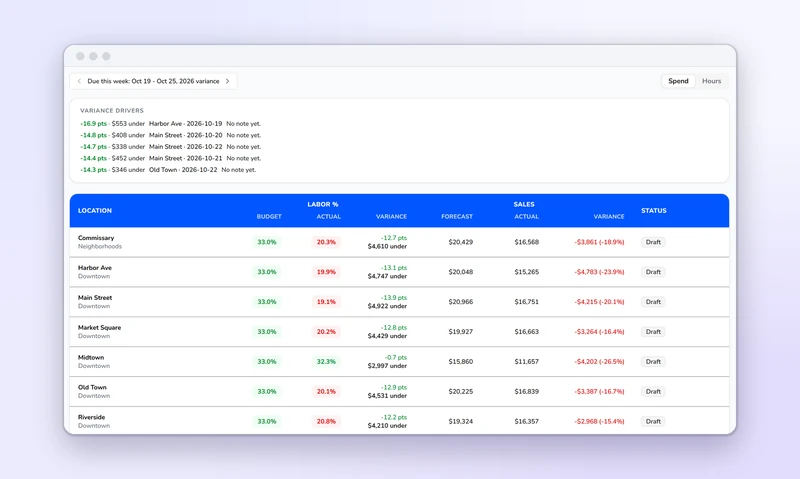
When the week closes, the variance report sets budgeted against actual labor percentage, and forecasted against actual sales, for every location. A day outside the band needs a short note before the manager submits. The reviewer approves it or sends it back, and approval locks the week's actuals.
Coffee shops and bakeries
Coffee shops: most sales land before late morning and the crew is small. One labor percentage for the whole day hides a slow afternoon. Sales per labor hour fits better. Open a day's half-hour curve to see when the rush starts and ends, and set a minimum-hours floor to keep enough people to open and close on a slow day.
Bakeries: bake shifts start hours before the doors open and follow the production plan, not the door count. A slow weekday with a full bake carries a high labor percentage. Scheduled cost uses each person's own pay rate, which shows the real gap between a baker and a counter clerk on the same hours. Before a holiday, raise the forecast for the selling days. If the prep day runs outside its band, the variance review keeps the manager's reason with it.
Time clock and time cards
Approve the week without opening every card, and send approved hours on to payroll.
See more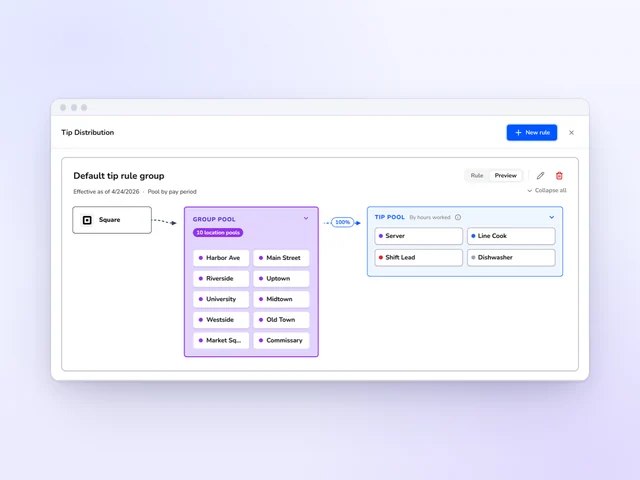
Tip distribution
Set tip pools and tip-outs by role, and Kronto does the math with card tips from Square or Toast.
See more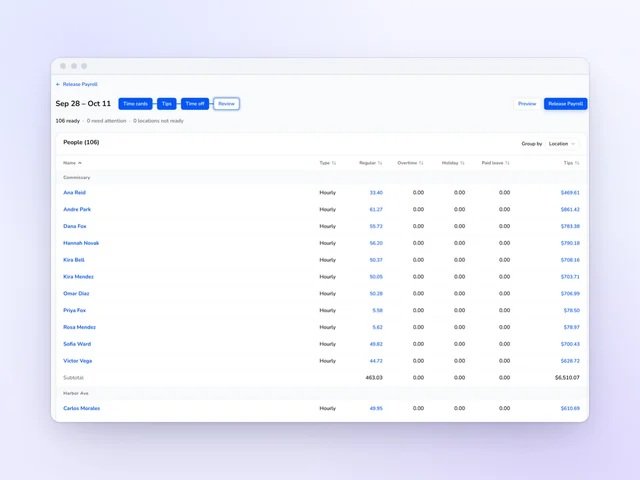
Payroll
Review hours and tips side by side, then release payroll from Kronto without retyping a time card.
See moreDivide total labor cost by sales for the same period and multiply by 100. Count wages, overtime, payroll taxes and benefits, not just hourly pay. A week with $9,000 of labor on $30,000 in sales runs 30%. Check it every week. A monthly number arrives too late to fix that month.
For published labor percentages by format, and a free template that budgets labor by day, see the restaurant budget template.
Kronto turns each day's sales forecast into a labor budget at your target, set as a labor percentage or as sales per labor hour. As you build the schedule, every day shows its budget, scheduled cost and over or under. Approvals can sign off the budget and the schedule, and the variance report reviews the week.
No. It shows the over or under, and the manager decides. If you want a second look, turn on schedule approval, and the week publishes once it's approved.
Yes, on the Pro plan, in early access, with approved hours and tips already in it. On every plan, Free included, you can export them to the payroll provider you use today instead.
Free for teams of up to 10. Larger teams pay $5 + tax per user per month on Standard, or $10 + tax on Pro, which adds running payroll in early access. Both paid plans start with a 14-day trial and bill monthly with no contract.
Product details checked against Kronto's live Budget workflow, schedule and variance report in October 2026. Last reviewed November 13, 2026.
Reviewed by Jonan Junwikul, Growth, Kronto, on November 13, 2026.
Know the week's labor cost before anyone clocks in
We'll build a week's schedule against your own sales forecast and show you the over or under, day by day.
No credit card requiredFree for up to 10 people
 Jim McKelvey