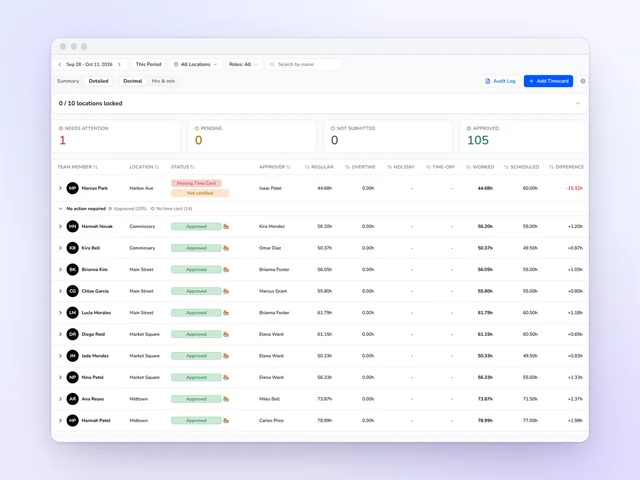
Time clock and time cards
Approve the week without opening every card, and send approved hours on to payroll.
See moreNYC Fair Workweek software for fast food
For NYC fast food locations, Kronto builds the Fair Workweek law's steps into your schedule: the 14-day deadline, the premium for each change, your team's yes or no, and the record the city can ask to see.
No credit card requiredFree for up to 10 people
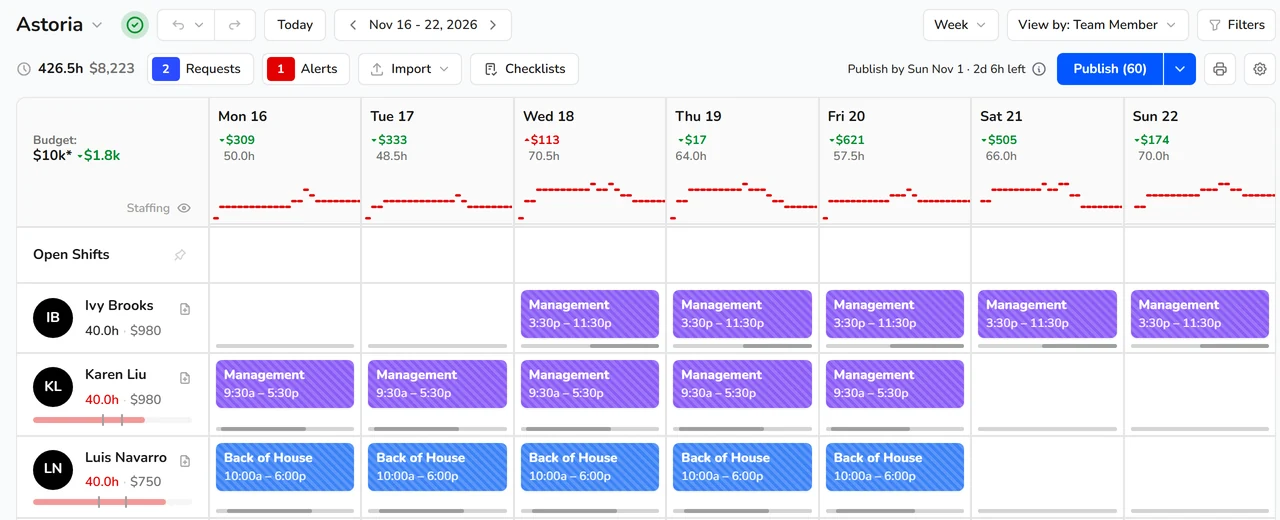
Publish deadline
A deadline strip next to Publish shows when the week has to reach your team and how long is left, then how late it is. Owners can get a heads-up 24, 12 or 6 hours before it passes.
If a week goes out late, Kronto lists each shift that differs from the person's expected schedule, with the premium it owes. Shifts that match owe nothing.
Premiums
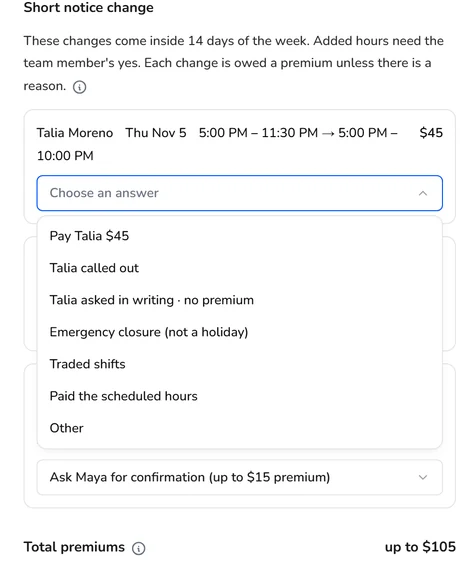
Thursday's opener can't make it, and the week went out days ago. Edit, remove, reassign or add a shift in a week you already sent, and a Before you save row shows the premium the city sets for that much notice. When one of the law's reasons applies, such as a written request from the team member or a voluntary trade, the manager picks it. Whether to make the change is still the manager's call, with the cost in front of them.
Each premium lands in the payroll export as its own line, with its pay code, day and amount.
Clopenings
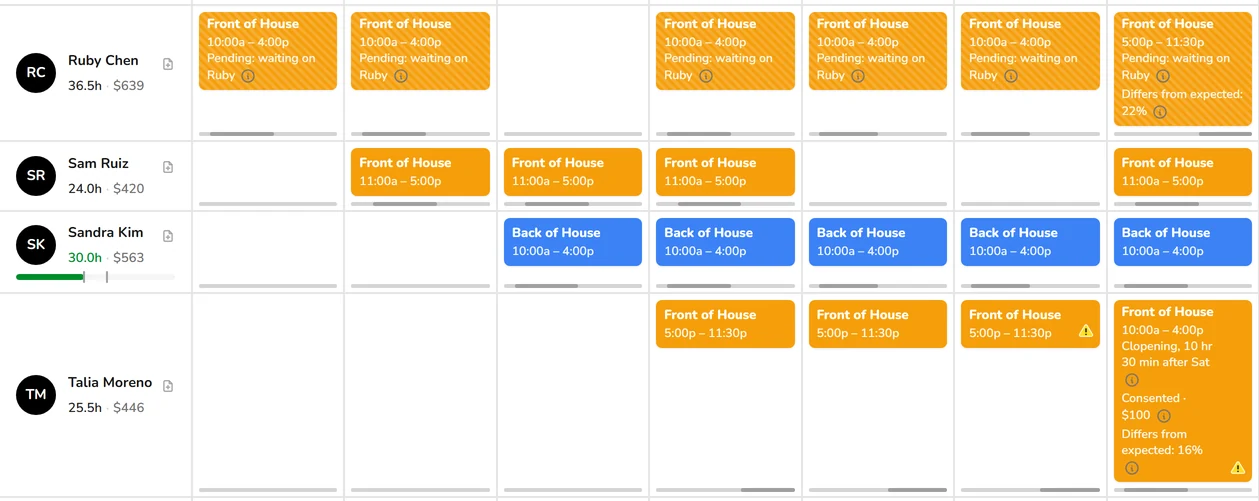
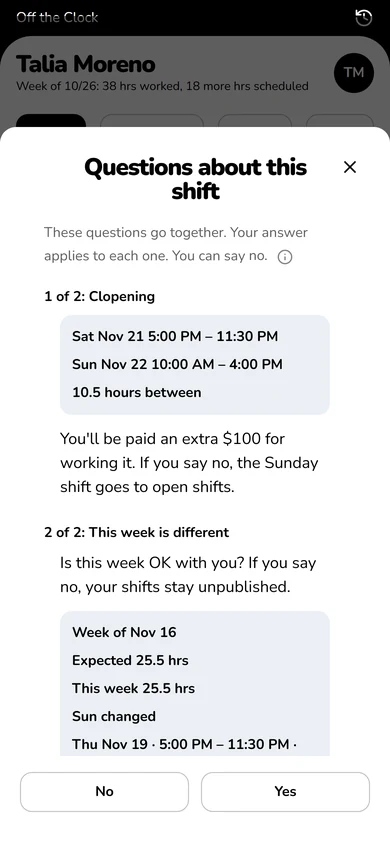
A close followed by an open less than 11 hours later becomes a row at publish. Kronto asks the team member for their written yes, or records their own dated request, and the shift card shows Pending, Consented or Declined.
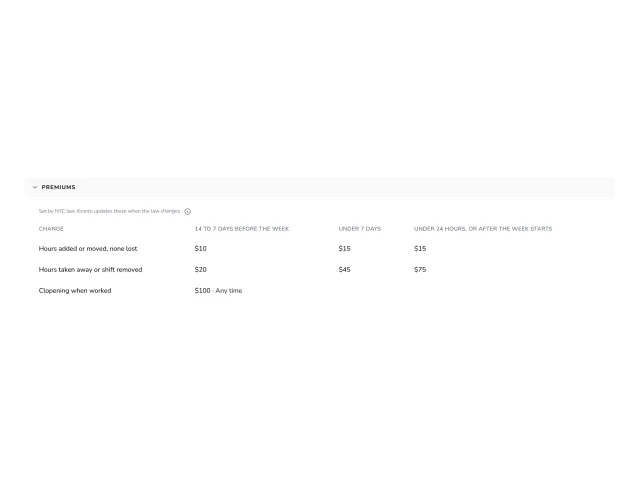
When both shifts are worked and the gap from the actual clock-out is under 11 hours, Kronto records the $100 premium. Before it gets that far, the manager can start the opener later instead and see what that owes.
Expected schedules
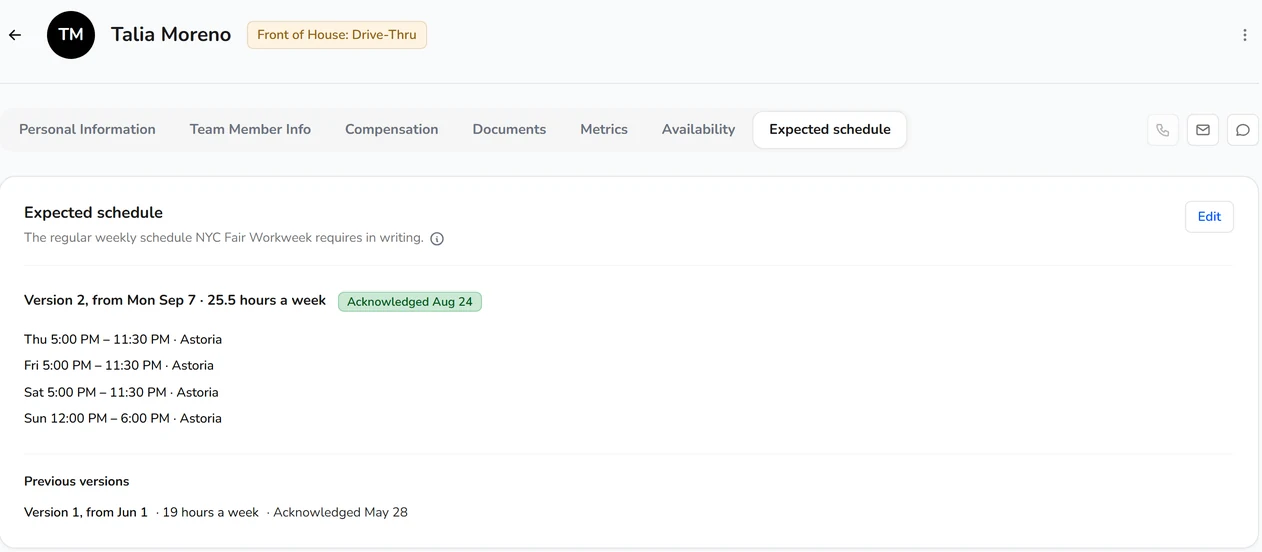
Each covered hourly team member has an expected schedule on their profile, with every version kept. Shift cards say when one is missing or how far the week differs from it, and the city's 15% weekly-variance check runs at publish.
On their phone
New shift, longer shift, clopening, staying late, a cut or a different week: each ask gets equal Yes and No buttons and an info icon with the law. Asks about the same shift arrive as one question, and every answer is saved with its date.
Home shows Extra pay owed until the premium goes to payroll, and Profile keeps the history.
The record
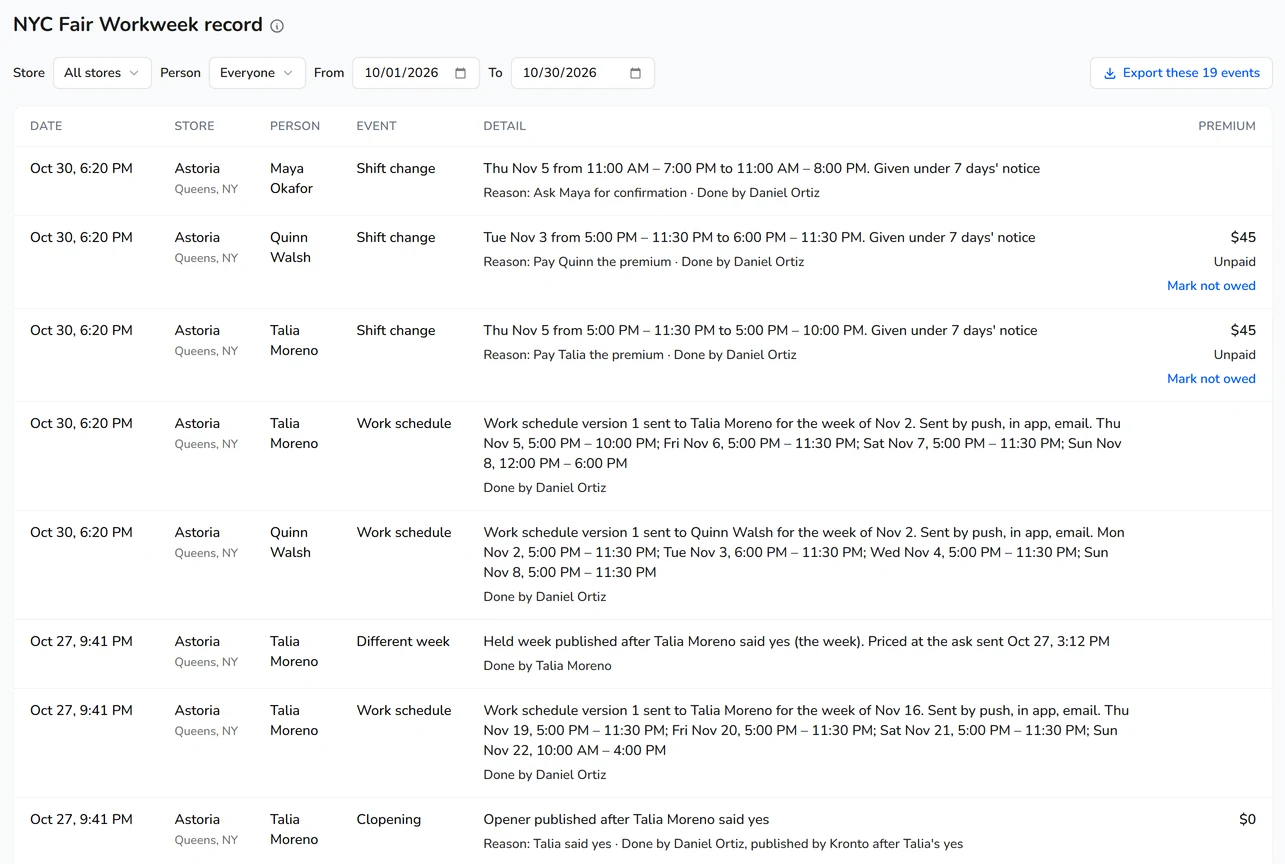
The NYC Fair Workweek record report shows every event by location, person and day, with the manager named and each premium's state: Unpaid, Sent to payroll or Not owed. Export it to CSV whenever you need it.
An owner can mark a recorded premium not owed with one of the law's exceptions, a note and evidence dated before the change. Nothing is edited or deleted. The change goes in as a new entry.
What it doesn't cover
Kronto keeps the steps and the record for NYC fast food. It doesn't decide whether the law covers your business, and it isn't legal advice.
Time clock and time cards
Approve the week without opening every card, and send approved hours on to payroll.
See more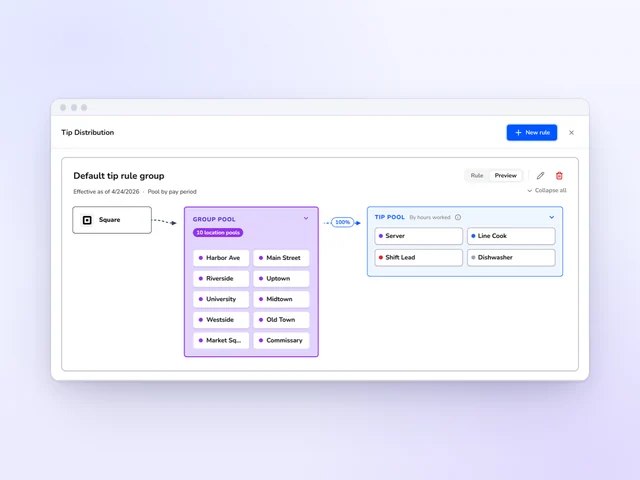
Tip distribution
Set tip pools and tip-outs by role, and Kronto does the math with card tips from Square or Toast.
See more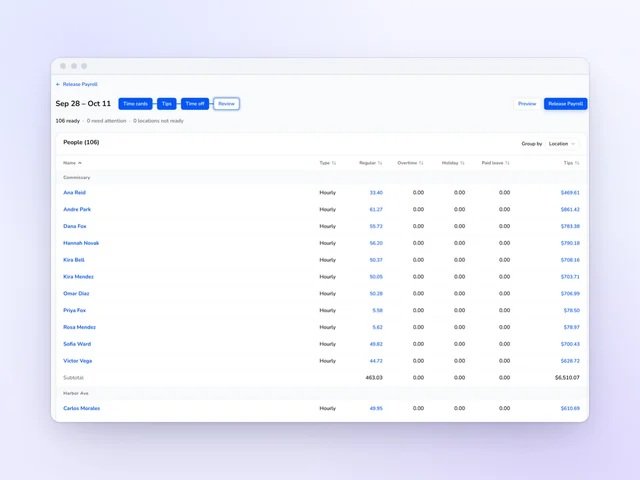
Payroll
Review hours and tips side by side, then release payroll from Kronto without retyping a time card.
See moreFor NYC fast food locations, Kronto counts down to the 14-day publish deadline, prices each change before it's saved, gets team members' written yes or no on their phone, records clopening premiums and keeps the record by location, person and day. Premiums reach the payroll export as their own lines.
It depends on the notice. With less than 14 days' notice, NYC sets $10 for added or moved hours and $20 for cut hours; with less than 7 days, $15 and $45; with less than 24 hours, $15 and $75. A worked clopening pays $100. Kronto works out each premium before the change is saved.
The amounts and the 11-hour clopening rule are set by NYC's Fair Workweek Law for fast food, as the city's Department of Consumer and Worker Protection explains in its FAQ for fast food employers[1]. Notice is counted to 12:00 AM on the first day of the work schedule[1].
NYC fast food stores you turn it on for. The city's law covers fast food chains with 30 or more locations nationally, and you confirm which of your stores it applies to. Kronto doesn't handle NYC retail Fair Workweek or other cities' scheduling laws, and it isn't legal advice.
The city defines a fast food establishment as part of a chain of 30 or more such establishments nationally[1].
No. Kronto builds the law's steps into your schedule and keeps the record, but your managers still make the calls, and you confirm which stores the law covers. It isn't legal advice.
Yes. Each premium lands in the payroll export as its own earning line, with its pay code, day and amount, and it is marked paid once. If your export template can't carry a premium line, Kronto stops and links you to the template rather than drop it.
NYC Fair Workweek comes with Standard, at $5 + tax per user per month, and with Pro, at $10 + tax, which adds running payroll in early access. Both bill monthly with no contract and start with a 14-day trial. The Free plan doesn't include it.
Product details checked against Kronto's live NYC Fair Workweek in October 2026. Law details from NYC DCWP. Not legal advice. Last reviewed November 4, 2026.
Reviewed by Jamie Rosenberg, Product, Kronto, on November 4, 2026.
Guide for quick-service restaurants
 Michael Haft
Run your NYC locations without the premium surprises
NYC Fair Workweek comes with Standard, at $5 + tax per user per month, billed monthly with no contract.
No credit card requiredFree for up to 10 people