
Restaurant shift swap policy: rules and template

Copy this restaurant shift swap policy so trades stay inside your rules: who can swap, notice, manager approval, overtime and minors, and why each rule exists.

Black-and-white photo of Jamie Rosenberg smiling on a New York rooftop

Jamie Rosenberg

Author ·

Reviewed by Jonan Junwikul

Growth, Kronto

A server checking a phone while setting a table.
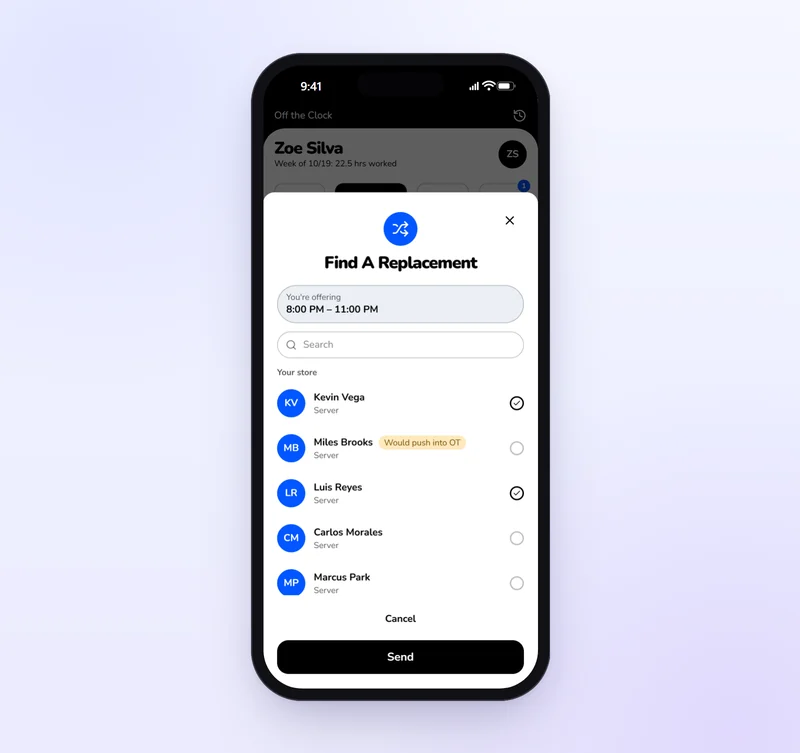
Choosing who can take a server's shift in the Kronto app, with one teammate flagged because the shift would push him into overtime.

In this guide

Restaurant shift swap policy template

Ten rules to paste into your handbook: who can swap, notice, manager approval, overtime and minors, each with its reason. It's in the guide below.

What is a restaurant shift swap policy?

It's the short set of rules for how servers, cooks and hosts trade or give away scheduled shifts: who can take a shift, how far ahead to ask, who approves, and who is responsible once it moves. A good one fits on a page and is enforced the same way for everyone, every week.

Without one, swaps happen in group texts and the schedule on the wall stops matching who shows up. With one, every swap has a record, a manager's yes and a clear owner.

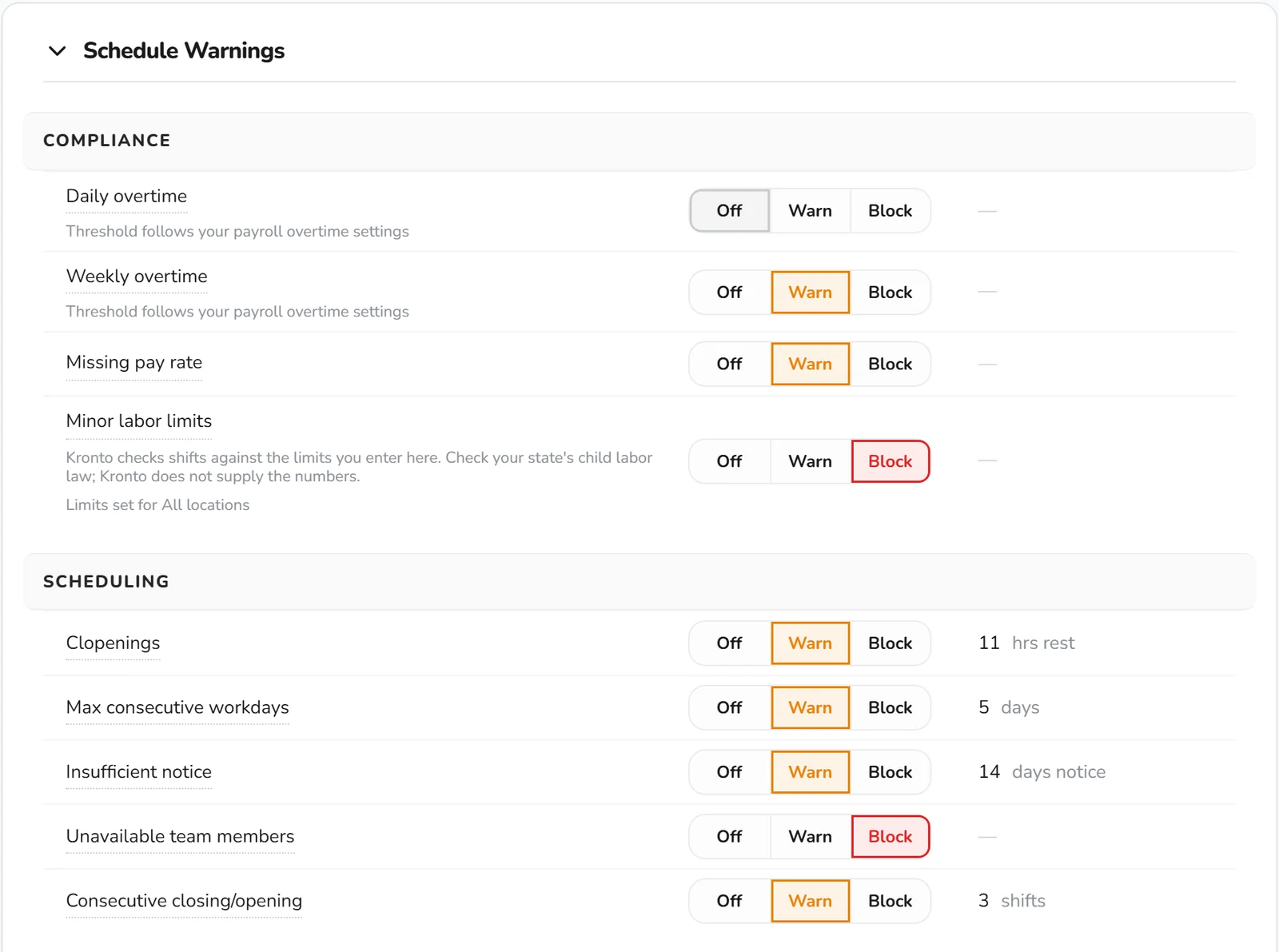
Kronto Schedule Warnings settings with Off, Warn and Block controls and thresholds for overtime, minor labor limits, clopenings, consecutive workdays and advance notice

Key takeaways

  1. A swap has to be requested in the scheduling app. One settled by text or penciled onto the schedule doesn't count.
  2. Shifts go only to teammates in the same role: server to server, line cook to line cook, host to host.
  3. 24 hours' notice is the floor. Sickness and emergencies go straight to the manager on duty.
  4. Until a manager approves, the shift belongs to whoever offered it.
  5. Turn down swaps that cause overtime, break a minor labor limit or leave a station without a trained person.
  6. Most of the year, federal rules let 14- and 15-year-olds work only between 7 a.m. and 7 p.m., and no more than 3 hours on a school day.
  7. After approval, the teammate who took the shift owns it, lateness and no-shows included.

How do you request a shift swap at a restaurant?

In the scheduling app, not by text. Open the shift, offer it to teammates who work the same role, and keep it until a manager approves. Ask as early as you can, and say whether you're giving away the whole shift or only the first or last few hours.

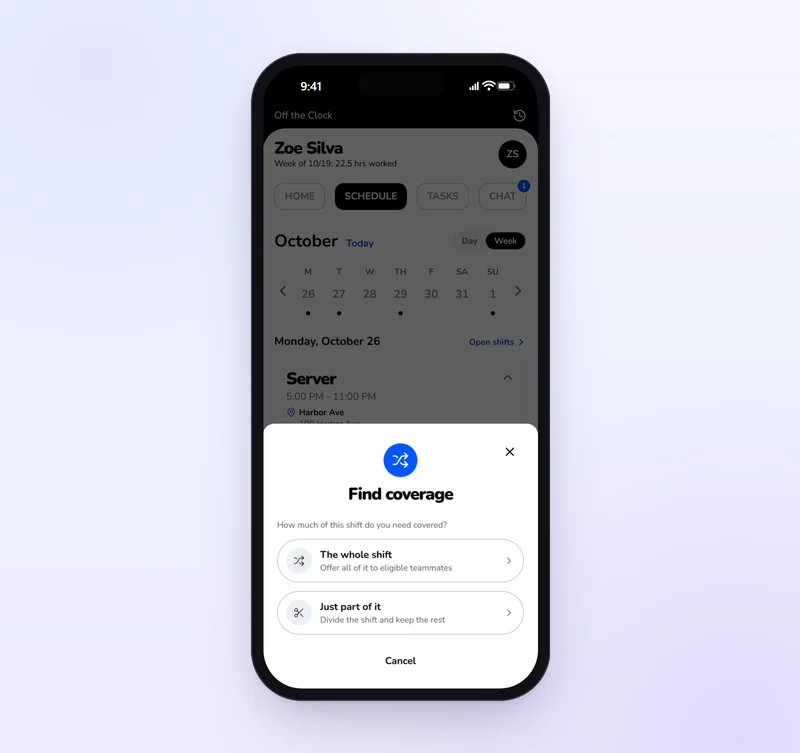
In Kronto, the server taps Find coverage on the published shift, picks from the teammates Kronto lists as eligible, and chooses the whole shift or part of it. A teammate accepts, then a manager approves before the schedule changes.

Kronto mobile app asking whether to find coverage for the whole shift or just part of it

When should a restaurant manager say no to a shift swap?

When the swap creates overtime you didn't budget for, breaks a minor labor limit, puts someone on a station they aren't trained for, or leaves a Friday section with only new servers. Say no the same way each time, with the reason. Then the policy reads as fair, not personal.

Federal overtime pay of at least time and one-half applies to hours over 40 in a workweek⁠[1]. The most common reason to decline is a teammate who'd cross 40 by taking the shift. Kronto shows each teammate's projected daily and weekly overtime for the hours on offer, before the manager approves.

How do shift swaps work for restaurant workers under 18?

The same as for everyone else, inside their legal limits. Under federal rules 14- and 15-year-olds can work only between 7 a.m. and 7 p.m. most of the year, and no more than 3 hours on a school day. Some states set tighter limits, and the stricter rule always applies.

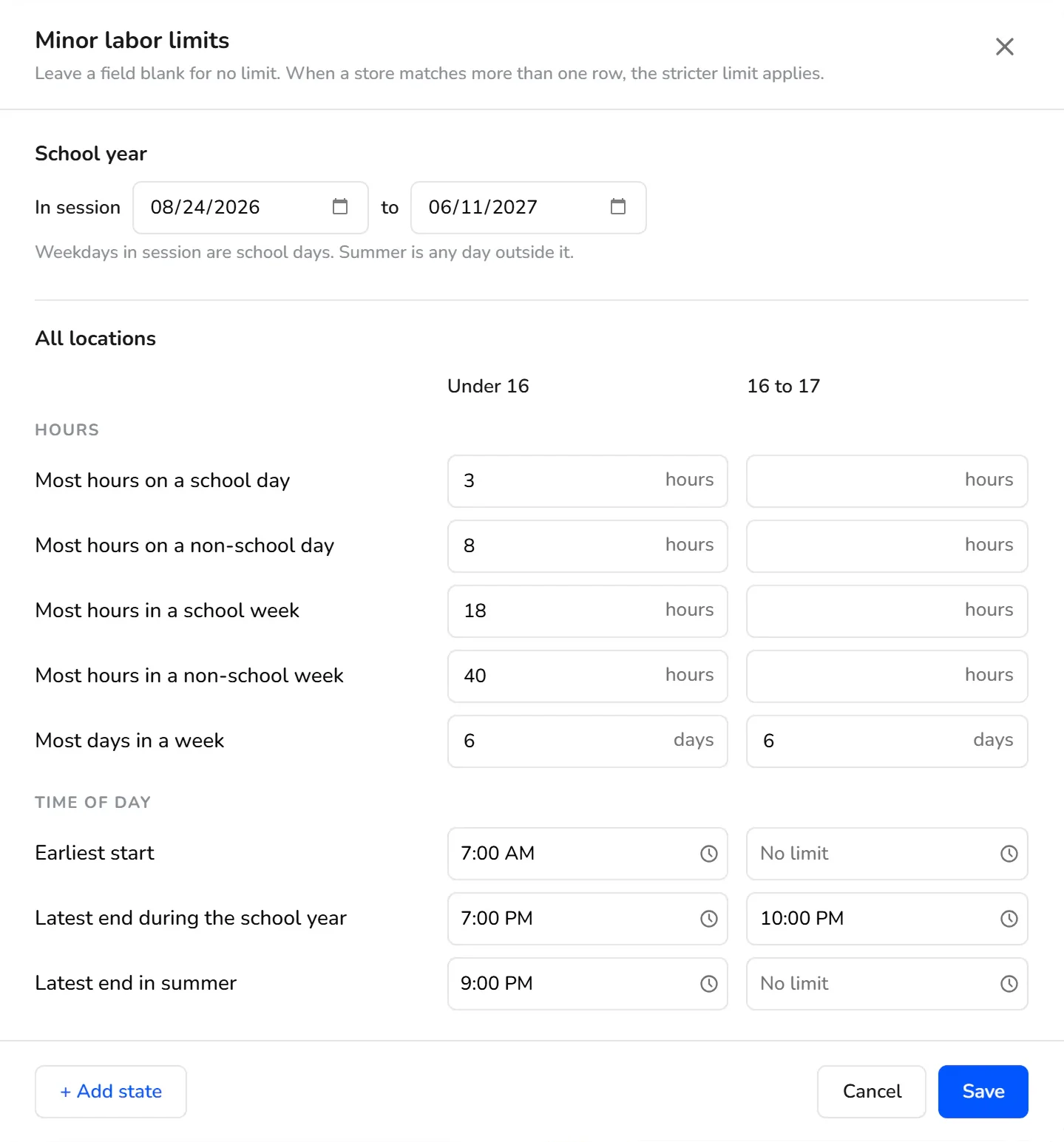
The federal limits for 14- and 15-year-olds run to 18 hours in a school week, 8 hours on a non-school day and 40 hours in a non-school week. Their evening limit moves to 9 p.m. from June 1 through Labor Day⁠[2]. At 16 and 17, federal law sets no hours limit, but a state can, and the stricter law applies⁠[2]. No one under 18 may operate a power-driven meat slicer⁠[2].

This matters in restaurants more than almost anywhere: in 2025, the National Restaurant Association reported that restaurants employ 1.9 million 16- to 19-year-olds, about one-third of all working teens⁠[3].

Kronto Minor labor limits editor with school-year dates and hour and time limits for team members under 16 and 16 to 17

Ten rules you can copy into the handbook

Paste this into your handbook, change the numbers to fit your restaurant, and post it beside the time clock.

  1. Request every swap in our scheduling app. One arranged by text or written on the schedule is not a swap.
  2. You can offer a shift only to teammates who work the same role: server to server, line cook to line cook, host to host.
  3. Request a swap at least 24 hours before the shift starts. Sick calls and emergencies go straight to the manager on duty.
  4. Offer the whole shift, or only the first or last part of it.
  5. A manager approves every swap. Until it's approved, the shift is still yours, and you're expected to work it.
  6. Managers can say no to a swap that puts someone into overtime, breaks minor labor rules, or leaves a station without a trained person.
  7. Once a swap is approved, the teammate who took the shift is responsible for it, including lateness and no-shows.
  8. Swaps don't change your pay rate. You're paid for the hours you actually work.
  9. No more than two swaps per person per week. A manager may allow more.
  10. Repeated last-minute swaps are handled as attendance issues.

What each rule saves you

Rule 1 gives every swap a record. The schedule, the time cards and the tip pool all agree on who worked. Rule 2 keeps a Saturday section from going to a host who has never carried a tray. Rules 5 and 6 put a person, not a group chat, in charge of overtime and minors. Rule 7 ends the argument about whose fault a no-show was.

Restaurant crews turn over from season to season. The National Restaurant Association reports that restaurant employees are three times more likely than the total U.S. workforce to be under 25⁠[4], and the Bureau of Labor Statistics notes that part-time work is common for waiters and waitresses⁠[5]. A written policy keeps swaps consistent while the staff changes around it.

Roll it out at pre-shift

  • Share the policy at a pre-shift meeting and give everyone a copy.
  • Break the group-text habit: managers stop approving swaps that skip the app.
  • Decide your swap scope: this restaurant only, or sister locations too.
  • Review swaps after a month. If one person swaps away every Sunday, fix the schedule, not the swaps.

Rules 2 and 5 run themselves in Kronto

A swap starts with Find coverage on a published shift. It goes only to teammates who hold the shift's role, aren't scheduled for overlapping hours and aren't on approved or pending time off. Your company decides how far offers reach: the same restaurant, the same district or the whole company.

Each teammate's projected overtime shows on the offer. With minor labor limits set to Block, Kronto leaves out anyone a swap would push past them. Nothing changes until a teammate accepts and a manager approves, and an offer nobody takes expires when the shift starts.

See the whole flow, from Find coverage to the manager's approval, on the shift swap app for restaurants page.

Shifts that keep getting swapped away are a scheduling problem. Change who works them when you build the week in the restaurant scheduling app.

Frequently asked questions

Should restaurant swaps need 24 hours' notice?

Twenty-four hours is a common floor. It gives a manager time to approve and the new person time to plan. Keep an exception for sickness and emergencies, which go to the manager on duty.

Who is responsible if the person who took the shift doesn't show up?

Once a manager approves the swap, the teammate who took the shift is responsible for it. Before approval, the original person still owns the shift.

Can employees swap shifts by text message?

They can agree on it by text, but the swap should only count once it's requested and approved in the scheduling app. Otherwise the schedule, time cards and tip records won't match who actually worked.

Does a shift swap change overtime pay?

It can. Overtime is counted on hours actually worked in the workweek. Whoever works the swapped shift has those hours added to their week.

What is a good reason to swap shifts?

Anything that would otherwise turn into a no-show or a late call-out: a class or exam, a second job, a family event, a medical appointment. A good policy doesn't ask for the reason. It asks for notice, a teammate who can do the work and a manager's approval.

Do you need a shift swap request form?

Not if swaps are requested in your scheduling app. The request, the teammate's accept and the manager's approval are the record. A paper shift swap request form only makes sense where staff don't use an app, and it should capture the same things: the shift, both names and the manager's sign-off.

Sources

  1. Fact Sheet #23: Overtime Pay Requirements of the FLSA, U.S. Department of Labor, Wage and Hour Division. Read October 23, 2026. ↩
  2. Fact Sheet #43: Child Labor Provisions of the Fair Labor Standards Act (FLSA) for Nonagricultural Occupations, U.S. Department of Labor, Wage and Hour Division. Read October 23, 2026. ↩
  3. Now Hiring: Restaurant Industry Projected to Add 490,000 Summer Jobs, National Restaurant Association. Read October 23, 2026. ↩
  4. New Association report provides a demographic profile of the restaurant workforce, National Restaurant Association. Read October 23, 2026. ↩
  5. Occupational Outlook Handbook: Waiters and Waitresses, U.S. Bureau of Labor Statistics. Read October 23, 2026. ↩

Rules checked against U.S. Department of Labor guidance; product steps checked against Kronto today. Last reviewed November 11, 2026.

Reviewed by Jonan Junwikul, Growth, Kronto, on November 11, 2026.

Every swap lands in the right paycheck

Kronto runs the schedule, the time clock and tips. Approved hours and tips go to payroll in Kronto on Pro (early access), or to the provider you already use on any plan. Standard is $5 + tax per user per month, with no contract.

Free for up to 10 people